


 Written by admin
Modern smartphones offer advanced connectivity options, and eSIM on iphone stands as one of the most useful features. Apple introduced embedded SIM technology so users can activate mobile plans without inserting a physical card. Many people now search how to install esim on iphone when they upgrade to newer iPhone models. Digital SIM activation also helps travelers and professionals who need multiple mobile plans on a single device. In this blog, you will learn the process to set up eSIM on iphone and manage it easily.
Mobile carriers now support digital profiles which users can activate through QR codes or network apps. Many users also wonder can i set up eSIM on my own without visiting a store. The answer usually depends on carrier instructions and device compatibility. Clear steps help you activate eSIM on iphone and connect your phone to a mobile network within minutes through reliable providers like eSimple. In this blog, you will explore complete guidance for add eSIM iphone and manage iphone eSIM settings effectively.
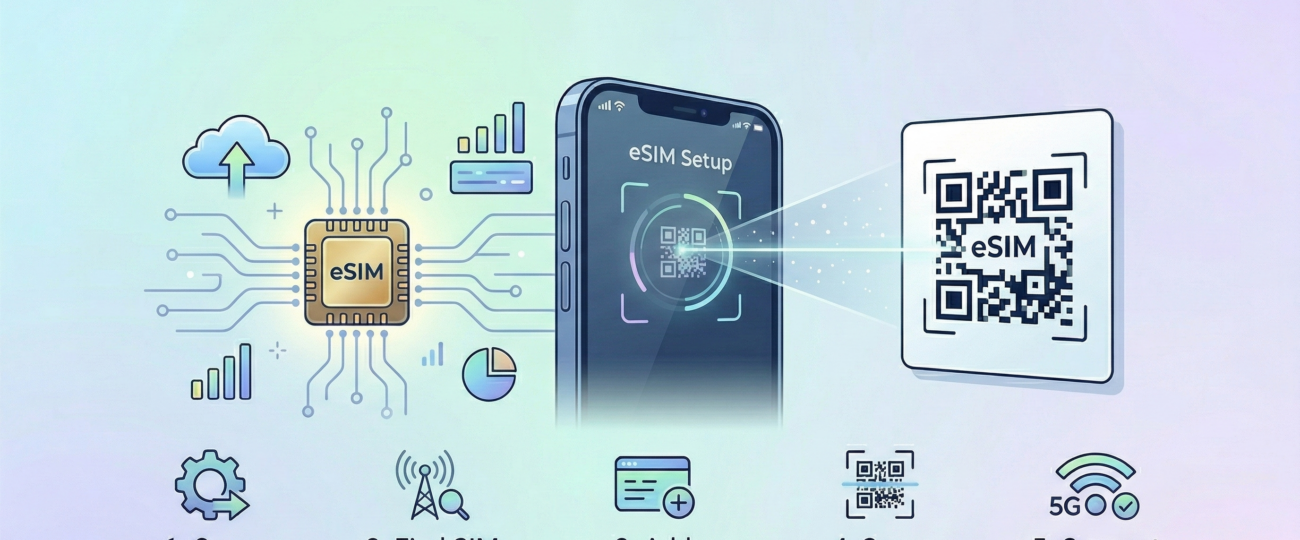
Apple introduced embedded SIM technology to simplify mobile connectivity. A digital chip inside the phone stores carrier profiles instead of using a removable SIM card. Many modern models support eSIM on iphone, which allows users to activate plans digitally. Users can connect to a network through QR code activation or manual configuration. Such technology helps reduce dependence on physical SIM cards.
Network providers deliver a digital profile that installs directly on the device. A user simply scans a QR code or enters carrier details through iphone eSIM settings. Activation usually occurs in a few minutes without physical installation. Many carriers also offer apps that assist users to download eSIM iphone profiles easily. Digital connectivity continues to expand as more networks support eSIM technology.
Flexibility becomes a major benefit of this system. Users can store several carrier profiles inside one device. Switching networks becomes simple through device settings. Many travelers prefer digital connectivity since they can change plans without replacing a SIM card. Interest continues to grow around how to install esim on iphone due to such advantages.
Convenience stands as one of the biggest reasons users adopt digital SIM technology. A physical SIM requires insertion or replacement whenever a user switches networks. A digital profile allows instant configuration through the phone interface. Many people now search activate eSIM on iphone since it reduces manual work. Remote activation also saves time when users purchase mobile plans online from an eSIM store like eSimple.
International travelers benefit greatly from digital SIM functionality. Travelers can purchase regional data plans before arrival in a new country. They simply scan a QR code and activate eSIM on iphone in minutes. No physical card swap becomes necessary during travel. Such convenience explains why people prefer to set up eSIM on iphone rather than traditional SIM methods.
Security also improves through embedded connectivity. A digital SIM remains inside the device which prevents removal if the phone gets lost or stolen. Carriers can disable a digital profile remotely through account access. Device security and flexible connectivity motivate many users to add eSIM iPhone profiles for work and personal use.
Installing an eSIM usually requires only a few simple steps. A carrier provides activation details through a QR code or manual configuration information. Users open the network settings on the device to begin the process. Apple devices provide clear instructions within iphone eSIM settings to guide installation. The following steps explain the most common ways to install an eSIM.
A carrier often sends a QR code after a user purchases a digital SIM plan. The user opens cellular settings and selects the option to add eSIM iPhone. The device camera scans the QR code provided by the carrier. The phone then downloads the digital profile automatically.
Activation completes within a few seconds once the system verifies the network details. Users can rename the plan to identify work or personal networks easily. The phone connects to the carrier network after configuration. This process remains the most common method to activate eSIM on iPhone.
Some carriers provide manual installation details instead of a QR code. Users enter the server information inside iPhone eSIM settings to configure the network. A common question appears as to where to find sm dp+ address on iphone during manual setup. The carrier usually sends this information through email or SMS.
Manual entry allows the device to connect to the remote provisioning server. The phone then downloads the carrier profile through the internet connection. Network credentials are installed on the embedded chip automatically. Such a method allows users to download esim iphone profile without scanning a QR code.
Many telecom providers now offer mobile apps for quick activation. Users install the carrier application and sign into their mobile account. The app provides an option to set up eSIM on iPhone directly within the interface. Activation often requires only a few taps inside the application.
The app sends network credentials to the phone through secure communication. The device then installs the digital profile automatically. This method simplifies the process for users who prefer a guided setup.
Apple devices include built in features to activate digital SIM profiles easily. Users open cellular settings and select the option to add a new plan. The phone provides instructions to scan a QR code or enter manual data. Many users ask can i set up esim on my own, and the answer is usually yes.
A stable internet connection allows the device to download the carrier profile instantly. Activation occurs within minutes once the network verifies user credentials. Users can then switch between available plans through device settings. Such flexibility explains why many people search how to install eSIM on iphone when they purchase a new device.
Some users encounter minor issues during digital SIM activation. Network compatibility often causes installation delays when a carrier does not support eSIM services. Device software version can also influence the process. Updated system software usually resolves most connectivity problems.
Incorrect carrier details may also interrupt manual installation. Users sometimes enter wrong information during manual configuration. Verification of carrier credentials often solves such problems quickly. Contacting customer support can also help users complete activate esim on iphone successfully.
Internet connectivity also plays an important role in the installation process. A weak connection may interrupt the download of the digital profile. A stable network allows the phone to connect with the provisioning server. Reliable internet access therefore supports smooth download esim iphone setup.
Embedded SIM technology continues to transform mobile connectivity across modern smartphones. Apple devices support digital profiles which simplify network activation and management. Many users now search how to install esim on iphone since the process requires only a few simple steps. Digital setup eliminates the need for physical SIM cards and manual replacement.
Users can activate mobile plans through QR codes, carrier apps, or manual configuration. Each method allows quick set up esim on iphone depending on the carrier instructions. Travelers and professionals benefit from the ability to switch networks quickly. Multiple carrier profiles also improve flexibility within a single device.
Simple instructions within iphone esim settings guide users throughout the installation process. Most people can complete activating esim on iphone without visiting a store. Users who want a deeper comparison of SIM technologies can also explore eSIM vs Physical SIM: The Guide to Pros, Cons and Differences to understand how digital and traditional SIM options compare. Digital SIM technology therefore continues to expand across new iPhone models. Reliable connectivity and convenient activation make esim on iphone an important feature for modern mobile users.
Yes, many carriers allow users to complete activation independently. The process usually involves scanning a QR code or entering carrier details manually. Apple devices provide guided instructions inside iphone esim settings. Most users therefore complete set up esim on iphone without visiting a service center.
Users open the cellular section inside device settings and select the option to add esim iphone. The phone camera scans the QR code provided by the carrier. The device then downloads the network profile automatically. This method remains the easiest way to activate esim on iphone.
The where to find sm dp+ address on iphone question usually relates to manual installation. Telecom providers supply the SM DP+ server address through email, SMS, or their mobile app. Users enter this information during manual configuration. The device then connects to the carrier server to download the profile.
Yes, many carriers allow users to download esim iphone profiles through apps or activation links. The phone connects to the network server and installs the digital profile automatically. This process requires internet connectivity and compatible device support. Digital download simplifies the overall installation experience.
Many modern Apple devices support esim on iphone functionality. Models from iPhone XS and later usually include embedded SIM capability. Some devices also support dual SIM through a combination of physical and digital profiles. Users can therefore activate esim on iphone alongside a traditional SIM card if required.
 North eSIM
Price range: 1.78 € through 56.45 €
North eSIM
Price range: 1.78 € through 56.45 €
 eSim Bahrain
Price range: 1.75 € through 55.43 €
eSim Bahrain
Price range: 1.75 € through 55.43 €
 eSim Bahamas
Price range: 5.80 € through 183.93 €
eSim Bahamas
Price range: 5.80 € through 183.93 €
 eSim Azerbaijan
Price range: 1.75 € through 60.28 €
eSim Azerbaijan
Price range: 1.75 € through 60.28 €
 eSim Australia
Price range: 1.25 € through 65.98 €
eSim Australia
Price range: 1.25 € through 65.98 €
© 2026 Esimple. All rights reserved by Cubixsol
